This Website & My Tooling – today: Pylance vs. ClutchPoint
What happens when you develop a VS Code extension that performs thousands of file operations per second — and Pylance tries to index every single one of them? That's exactly what I ran into while building ClutchPoint.
The Extension Host grew heavier, the UI started stuttering, and thanks to my own diagnostics extension Gist Factor VS, I was able to isolate the culprit: ms-python.vscode-pylance.
Over 500 active, uncleaned listeners during rapid deletion cycles
Event-loop blocking from an overloaded Extension Host
Massive RAM growth — the garbage collector couldn't keep up
I'm writing this as a real-world report — including the exact configuration — because Pylance is invaluable in standard projects, but becomes a genuine trap in unusual environments.
That alone stops the most aggressive RAM consumption. The full configuration is below.
The Problem: When the Language Server Becomes the Bottleneck
While developing ClutchPoint — a VS Code extension for automated high-frequency file operations — I noticed that VS Code started stuttering badly at high file throughput.
Using my diagnostics extension Gist Factor VS, I was able to isolate the culprit quickly: ms-python.vscode-pylance.
The issue: Pylance tries to immediately index every newly created or changed file. In a workflow that generates hundreds of temporary files, this leads to:
Massive memory leaks: RAM usage climbs and never comes back down.
Event-loop blocking: Pylance occupies the Extension Host so heavily that other extensions — and the UI itself — respond with a delay.
Leaking listeners: Over 500 active, uncleaned listeners were measurable during rapid deletion cycles.
The Analysis: Why Pylance "Leaks"
Pylance is built on Pyright. In standard projects, its behaviour — deep indexing of all workspace files — is intentional and useful. In a high-frequency environment or with large workspaces (e.g. inside a Vagrant dev setup), this eagerness causes:
The garbage collector to fall behind on cleanup.
Every new file event to trigger a new analysis task — the queue grows continuously.
Event listeners for file changes to be registered but never cleanly unregistered.
The result is a classic observer leak at the Extension Host level.
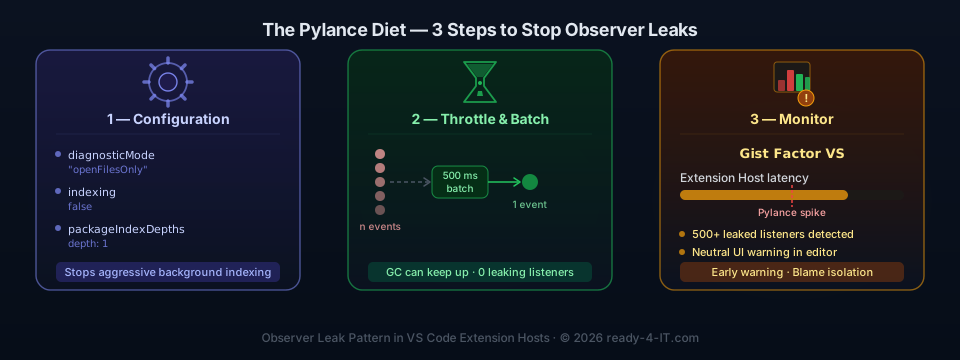
The Solution: The "Pylance Diet"
To restore stability without losing Pylance's intelligence, we implemented a three-step strategy:
1) Optimise the configuration (settings.json)
The most important step is to curb Pylance's eagerness:
Note: These settings are intentionally restrictive. For teams with large Python monorepos they may reduce comfort slightly. As a compromise, apply them in Workspace Settings rather than User Settings — that way the diet only applies to stressed projects.
Columns
"python.analysis.diagnosticMode"
"openFilesOnly"
Only open files are analysed. The single most effective lever against RAM leaks.
"python.analysis.indexing"
false
Stops broad background indexing of the entire workspace.
"python.analysis.packageIndexDepths"
[{"name": "", "depth": 1}]
Limits how deep Pylance digs into installed libraries.
"python.analysis.typeCheckingMode"
"basic"
Reduces compute overhead without giving up fundamental type checking.
"python.analysis.persistAllIndices"
false
Reduces disk I/O by writing fewer cache files to disk.
2) Architectural adjustment: throttling in ClutchPoint
In ClutchPoint's extension logic we introduced batching. Instead of bombarding Pylance with every individual file event, operations are grouped and pushed together. This gives the language server time to breathe:
// Simplified — batching instead of triggering on every individual save
const pendingFiles = new Set<string>();
let batchTimer: NodeJS.Timeout | undefined;

function scheduleAnalysis(uri: vscode.Uri) {
  pendingFiles.add(uri.fsPath);
  if (batchTimer) clearTimeout(batchTimer);
  batchTimer = setTimeout(() => {
    // Notify Pylance only once per batch
    pendingFiles.clear();
    batchTimer = undefined;
  }, 500); // 500 ms debounce
}
3) Transparency for the user: Gist Factor VS
Through Gist Factor VS we now provide feedback to the user: when system latency rises because of Pylance, a notice appears in the editor. This makes it clear that it's not the user's own app but the language server that's at its limit — a "neutral referee" between the extension and the editor.
Bonus: What Gist Factor VS Also Found — LEAK_WEBVIEW_NO_DISPOSED_CHECK
While analysing the Pylance leaks, Gist Factor VS simultaneously uncovered a second, widespread error pattern in VS Code extensions: LEAK_WEBVIEW_NO_DISPOSED_CHECK.
Here is a representative excerpt from the real diagnostic output (condensed; original: 35 hits across 8 files):
[
  {
    "code": "LEAK_WEBVIEW_NO_DISPOSED_CHECK",
    "severity": 4,
    "message": "webview.postMessage called without a check for a disposed panel.",
    "source": "gistfactor",
    "startLineNumber": 209
  },
  {
    "code": "LEAK_WEBVIEW_NO_DISPOSED_CHECK",
    "severity": 4,
    "message": "webview.postMessage called without a check for a disposed panel.",
    "source": "gistfactor",
    "startLineNumber": 175
  }
]
What does this mean?
The pattern is simple but dangerous: an extension sends messages to a webview panel — without checking whether the panel is still open.
User closes a dashboard tab → panel is disposed.
An async process is still running and wants to send a result.
webview.postMessage is called → error or zombie reference in memory.
In a high-frequency scenario (ClutchPoint constantly triggers file events that want to update dashboards), this accumulates into a real leak problem.
The fix: SafeMessenger
Instead of scattering if (this.panel) guards everywhere, a central wrapper solves the problem once and for all:
// src/runtime/safeMessenger.ts
import * as vscode from 'vscode';

export class SafeMessenger {
    private _isDisposed = false;

    constructor(private readonly _panel: vscode.WebviewPanel) {
        this._panel.onDidDispose(() => {
            this._isDisposed = true;
        });
    }

    public postMessage(message: unknown): void {
        if (this._isDisposed) {
            return; // Panel already closed — message is discarded
        }
        try {
            this._panel.webview.postMessage(message);
        } catch (err) {
            console.error('[SafeMessenger] Failed to send message:', err);
        }
    }

    public get isDisposed(): boolean {
        return this._isDisposed;
    }
}
This wrapper is also the foundation for the Disturber Radar in Gist Factor VS: failed send attempts can be logged and surfaced in the dashboard — giving clear visibility into which extensions are actively trying to reach already-closed panels.
Alternatives: When the Diet Isn't Enough
If configuration alone doesn't cut it, there are two viable alternatives:
Ruff (to offload Pylance)
Ruff is a linting and formatting tool written in Rust — blazing fast and resource-efficient. It can fully replace Pylance for linting, letting the language server focus on type checking only.
Prerequisite: the VS Code extension charliermarsh.ruff must be installed. This entry is best placed in the VS Code user settings (%APPDATA%\Code\User\settings.json):
The assignment editor.defaultFormatter = charliermarsh.ruff does not take effect if the extension is missing.
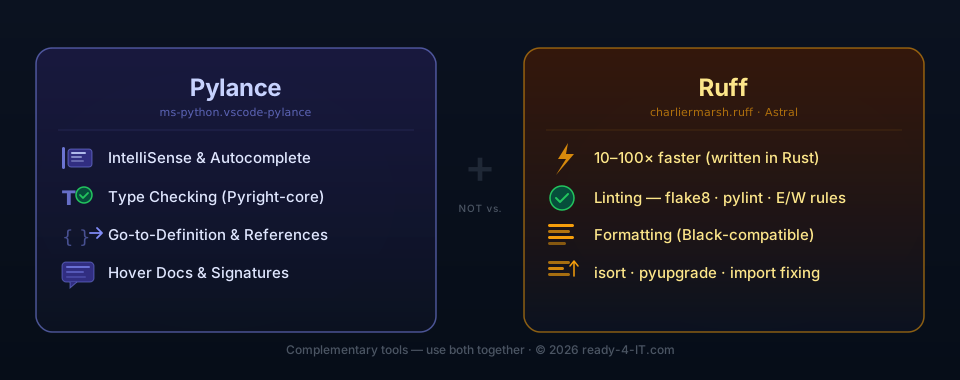
Ruff does not replace Pylance — task split at a glance:
Feature
Pylance
Ruff
IntelliSense / Autocomplete
✅
❌
Type checking (via Pyright)
✅
❌
Go-to-Definition
✅
❌
Hover docs / signatures
✅
❌
Linting (flake8, pylint…)
weak
✅
Formatting (Black-compatible)
❌
✅
Import sorting (isort)
❌
✅
Speed
normal
10–100× faster
Can Pylance be replaced by Ruff? Only partially. Ruff takes over linting and formatting completely — but not IntelliSense, type checking, or Go-to-Definition. Anyone relying on those IDE features still needs Pylance.
For pure script and CLI projects (manifest validators, automation tools, scripts that run primarily in the terminal rather than in the IDE): Pylance can be disabled per project without affecting anything else:
// .vscode/settings.json in the project folder
{
  "python.languageServer": "None"
}
Ruff then handles linting and formatting — the Extension Host stays completely free, without impacting other projects.
BasedPyright (as a Pylance replacement)
BasedPyright is a community fork of the Pyright core — more resource-efficient than Pylance and without Microsoft telemetry. A serious option for projects that consistently suffer under Pylance.
Conclusion
Pylance is powerful — but it wasn't designed for every environment. For developers working with automated file operations, large Vagrant workspaces, or monorepos, a "diet" of settings is often unavoidable to keep the Extension Host stable.
The decisive first step:
"python.analysis.diagnosticMode": "openFilesOnly"
After that, watch the pylance RAM usage in Task Manager — the difference is usually visible immediately.
Context: test environment
- OS: Windows 10 Home / Windows 11
- VS Code: 1.80+
- Pylance: ms-python.vscode-pylance
- Vagrant workspace with multiple open PHP/JS/Python projects
- Extension: ClutchPoint (High-Frequency File Operations)
- Diagnostics: Gist Factor VS
Support the Journey & Development! 🚀
If my IT guides or the Snapmaker Wiki saved your project (or your hardware), I'd appreciate a coffee! ☕ Your support doesn't just cover hosting and testing costs—it also fuels the development of my apps and tools. Every donation helps me dedicate more time to coding solutions that make our tech-life easier. Thank you for being part of this!