This Website & My Tooling – today: VS Code Collision with Bitdefender
Today was one of those days where you first think "Hardware broken?!" and in the end it's a chain of:
4 open workspaces
Projects on a slow HDD (Random I/O)
VS Code / Git File Watching
Bitdefender (bdservicehost.exe), scanning on every access
The result: Windows became extremely slow and even beeped.
I'm deliberately writing this as an experience report — including copy/paste snippets — because exactly these kinds of articles help me in everyday life.
TL;DR (Quick Wins)
If you don't have time for the whole story, start here:
1) VS Code: Disable Git Autorefresh (a game changer for large repos / slow drives)
// User Settings (settings.json)
{
  "git.autorefresh": false
}
2) VS Code: Defuse Watchers (reduces I/O + triggers antivirus less often)
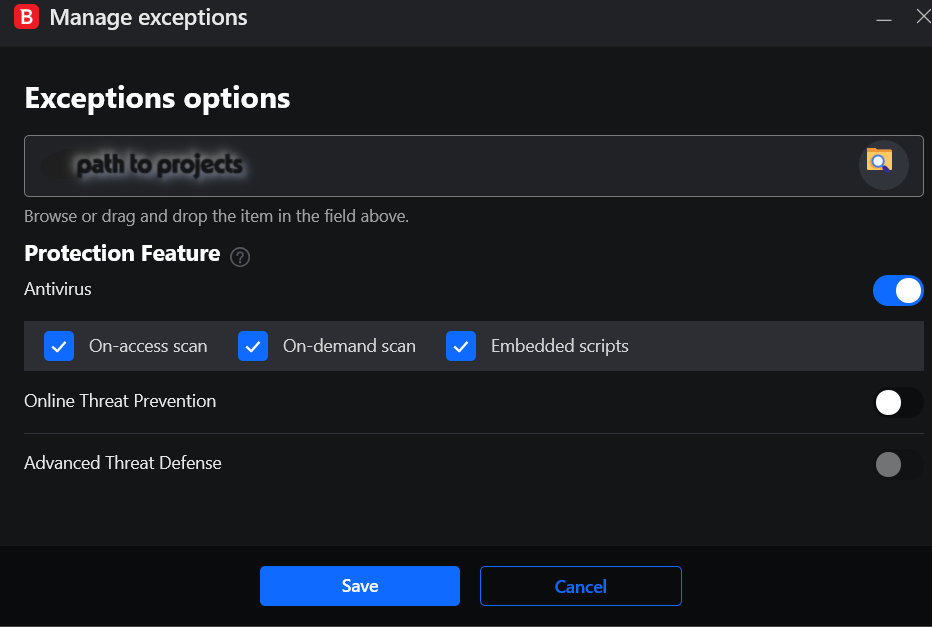
3) Bitdefender: Are projects already excluded? Good. Then additionally add VS Code system paths (Extensions/Cache) to exceptions.
4) If possible: put active repos on SSD/NVMe. HDD + many small files is the perfect performance trap.
How It Started: the Beeping
Symptom: Windows beeps (for me something like "2× short ... long pause ... then 2× short faster"), but:
not during boot,
but while Windows is running,
and at the same time everything becomes sluggish.
That's concerning because you first think of BIOS beep codes. But for me it wasn't a boot problem — it was a "system is overloaded and input feels blocked".
Diagnosis: Task Manager & Resource Monitor
1) Task Manager
CPU wasn't the culprit (for me ~17%). What was noticeable:
Disk significantly high!
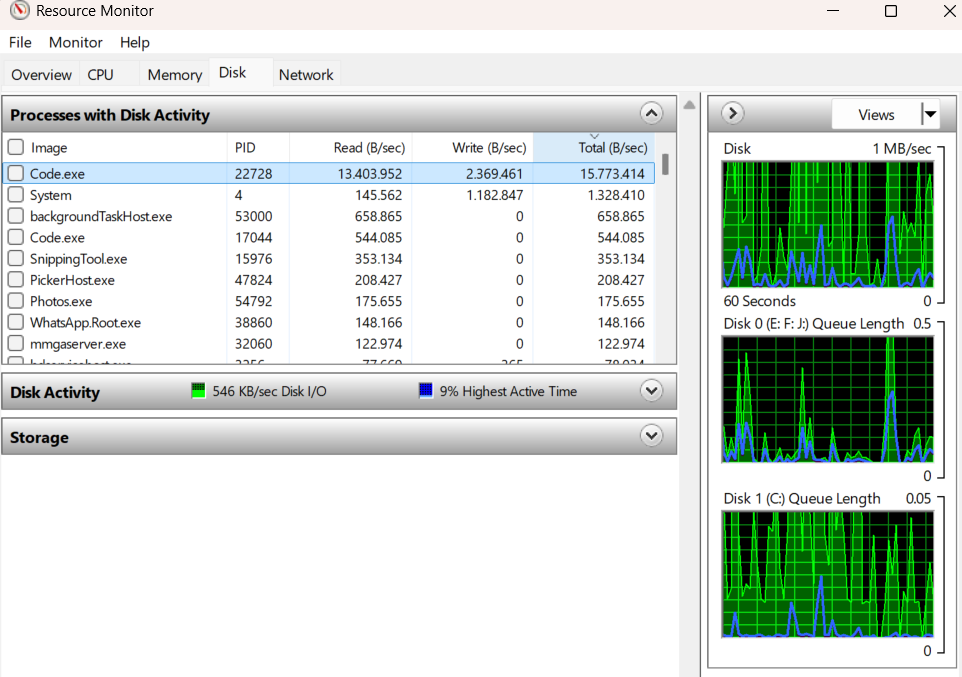
VS Code (Code.exe) with noticeable disk load
2) The Decisive Look: Active Time & Queue
In Resource Monitor (tab "Disk") you see two things that often say more than "MB/s":
Active Time 100% on the HDD
Queue Length high (backlog of requests)
That feels like:
Typing lags,
Clicks get "swallowed",
the system responds with delay,
and it can even cause beep tones.
The Actual Root Cause
For me it was a collision of:
1) Many small files
Node: node_modules/ (tens of thousands of files)
PHP: vendor/
Python: .venv/, __pycache__/
Git: .git/ (Objects, Index, Status-Reads)
2) VS Code Watcher + Git Autorefresh
VS Code queries Git regularly.
Git touches extremely many files in the process.
3) Bitdefender scans in parallel
bdservicehost.exe reads along.
Even if data throughput is "only" 10–20 MB/s, an HDD can be completely at its limit due to random I/O.
Git touches extremely many files; prevents "scanner in between".
Node
C:\\Program Files\\nodejs\\node.exe
Node tools + watcher + npm work with very many small files.
PHP
php.exe (depending on setup)
Composer/vendor I/O, scans, builds.
Python
python.exe (depending on setup)
venv/cache/test caches.
Security note: Set exceptions only for trusted folders/tools. I use this as a performance tradeoff for dev folders, not for downloads/random ZIPs.
Why node_modules / vendor Are So Important Here
These folders aren't "large" because they have many MB — but because they have many individual files.
HDDs are brutally slow with "many small reads". Watcher + Git + Antivirus turns this into a permanent queue.
Conclusion
The biggest "aha" moment for me was how much Git Autorefresh can trigger in combination with an HDD.
If you want to test just one thing immediately: turn off git.autorefresh — and observe what happens with Queue Length.
When the editor suddenly seems sluggish (typing lag, high CPU, fans), it's often not "the extension", but the interplay of file watchers and antivirus scanning.
This is what the reward looks like!
The result: Significantly faster work. The Queue Length dropped from sometimes over 90,000 to under 15,000 — even with multiple open workspaces.
This is a pragmatic checklist — just take the points you need.
System Information (abbreviated)
- OS: Windows 10 Home (2009)
- CPU: Intel Core i9-13900KF
- RAM: 32 GB
- Storage: 1 TB NVMe (SSD) + 12 TB HDD (typ. 7200 RPM)
- Controller: SATA AHCI + NVMe
- VS Code: 1.106.3
- Bitdefender: Total Security Build 27.0.55.303
In purely computational terms, the combination of modern CPU, 32 GB RAM and NVMe+HDD should have been able to handle the load; the bottleneck is better explained by very high IOPS load (many small file operations) combined with AV scans and watcher interactions.
Symptoms
VS Code (or Cursor/VSCodium) becomes slow when typing/saving.
Git is sluggish, git status takes noticeably long in large repos.
CPU load in Bitdefender/Antimalware or in the watcher process.
Typical Cause
Large workspaces generate many filesystem events.
Antivirus scans changed files repeatedly.
Watcher triggers more work → feedback loop.
Recommended Measures
1) Exclude workspace in Bitdefender (or AV)
Exclude the root folder(s) where your repos are located.
With Vagrant/Shared Folders, also exclude these paths.
This is not security advice, but a performance/productivity tradeoff.
Date: 02.02.2026
Support the Journey & Development! 🚀
If my IT guides or the Snapmaker Wiki saved your project (or your hardware), I'd appreciate a coffee! ☕ Your support doesn't just cover hosting and testing costs—it also fuels the development of my apps and tools. Every donation helps me dedicate more time to coding solutions that make our tech-life easier. Thank you for being part of this!