

Error: Invalid Frontmatter
Path: /www/htdocs/w01a2ab9/ready-4-it.com/public/user/pages/03.produktoverview/05.akc/product.en.md
Failed to read /www/htdocs/w01a2ab9/ready-4-it.com/public/user/pages/03.produktoverview/05.akc/product.en.md: Unable to parse at line 236 (near " free: ✓").
---
title: 'AI Keep Clean'
lang: en
slug: akc
template: product
eyebrow: 'VS Code Extension'
menu: 'AI Keep Clean'
lead: 'Stop VS Code chaos without cloud lock-in: workspace presets, indent guides, and Explorer root colors — Free to start, Pro when you are serious.'
published: true
visible: true
generated_by_pim: true
pim_id: pim-r4it-akc
pim_translation_id: pim-r4it-akc-en
provider_id: r4it
metadata:
  description: 'Stop VS Code chaos without cloud lock-in: workspace presets, indent guides, and Explorer root colors — Free to start, Pro when you are serious.'
pim:
  source_file: /srv/hostdev/r4it/dev/r4it_vetter_place/exports/timejunky/r4it/vetter-export_latest/products.json
  target: r4it
  generated_at: '2026-09-15T21:50:55.409840+00:00'
  product_slug: akc
  product_translationKey: akc
  lifecycle_status: released
  marketplace: payhip
  marketplaces:
    payhip:
      product_id: 5QHzM
      payhip_url: 'https://payhip.com/b/5QHzM'
      variants: {  }
      enabled: true
  destinations:
    r4it:
      enabled: true
      visibility: public
    alveos:
      enabled: true
      visibility: public
    targets:
      r4it:
        destinations:
          grav_pages:
            enabled: true
            under: 03.produktoverview
          payhip:
            enabled: true
            mapping_mode: multiple_products
            payhip_product_id: 5QHzM
            per_tier_product_ids:
              trial: 5QHzM
              pro: 01Fv7
              team: iz8HG
              enterprise: OzC8V
            variants: {  }
            secondary_checkout:
              enabled: true
              payhip_product_id: 01Fv7
              per_tier_product_ids:
                trial: 5QHzM
                pro: 01Fv7
                team: iz8HG
                enterprise: OzC8V
              variants: {  }
            tier_visibility:
              team: hidden
              enterprise: hidden
              team_5: hidden
              team5: hidden
              team_10: hidden
              team10: hidden
      alveos:
        destinations:
          grav_pages:
            enabled: true
  matrices:
    grav_page_meta:
      eyebrow: 'VS Code Extension'
      category: vscode
      category_ribbon: vscode
      logo_size: 180
      chips:
        - 'Workspace Presets'
        - 'Root Colors'
        - 'Indent Guides'
        - 'Local AI'
        - 'Terminal Paths'
        - Local-first
      license_badges:
        - freemium
    requirements_display: guides_only
    guide_cta_mode: single
    hero_cta_max: 3
    requirements:
      note: 'Installation: VS Code öffnen → Extensions (Ctrl+Shift+X) → Marketplace-ID in die Suche eingeben. Nur fuer VS Code getestet. Derivate wie Cursor bitte vor dem Kauf selbst pruefen.'
      columns:
        -
          key: requirement
          label: Requirement
        -
          key: version
          label: 'Version / Status'
      rows:
        -
          values:
            requirement: 'Host platform'
            version: 'VS Code (Windows, macOS, Linux)'
        -
          values:
            requirement: 'Extension type'
            version: 'VS Code Extension'
        -
          values:
            requirement: Marketplace-ID
            version: ready-4-it.r4it-aikeepclean
        -
          values:
            requirement: 'Minimum VS Code version'
            version: 1.85+
        -
          values:
            requirement: 'Recommended VS Code version'
            version: 'Latest stable'
        -
          values:
            requirement: 'AI providers (optional)'
            version: 'Ollama, OpenAI, Azure OpenAI or compatible'
    license_table:
      rows:
        -
          key: free
          name: Free
          activations: '1'
          price: €0
        -
          key: trial
          name: 'Trial (14 days)'
          activations: '2'
          price: €0
        -
          key: pro
          name: Pro
          activations: '2'
          price: €49
    assets:
      video_urls_display: gallery
      gallery_items:
        -
          file: 01.png
        -
          file: 02.png
        -
          file: 03.png
        -
          file: 04.png
        -
          file: 05.png
        -
          file: 06.png
      youtube_channel_url: 'https://www.youtube.com/@ready-4-it_Luxembourg'
      video_urls:
        shared:
          -
            title:
              en: 'Stop fighting VS Code terminal paths'
              de: 'Schluss mit VS Code Terminal-Pfad-Chaos'
              fr: 'Fini les chemins de terminal VS Code chaotiques'
              lb: 'Schluss mat VS Code Terminal-Pfad-Chaos'
            url: 'https://youtu.be/vK7eMXZQoOI'
          -
            title:
              en: 'Visually Separate Your VS Code Workspaces with AI Keep Clean'
              de: 'VS Code Workspaces visuell trennen mit AI Keep Clean'
              fr: 'Séparez visuellement vos workspaces VS Code avec AI Keep Clean'
              lb: 'VS Code Workspaces visuell trennen mat AI Keep Clean'
            url: 'https://youtu.be/ctfw4hkpaDA'
          -
            title:
              en: 'Make your code readable: VS Code Indent Guides'
              de: 'Code lesbarer machen: VS Code Indent Guides'
              fr: 'Rendez votre code lisible : Indent Guides VS Code'
              lb: 'Code liesbar maachen: VS Code Indent Guides'
            url: 'https://youtu.be/1g8AWlebqWQ'
    overview:
      columns:
        -
          key: aspect
          label: Aspect
        -
          key: free
          label: Free
        -
          key: trial
          label: Trial
        -
          key: pro
          label: Pro
      rows:
        -
          values:
            aspect: 'Max custom presets'
            free: '1'
            trial: '3'
            pro: '150'
        -
          values:
            aspect: 'Import presets'
            free: –
            trial: ✓
            pro: ✓
        -
          values:
            aspect: 'Export presets'
            free: –
            trial: ✓
            pro: ✓
        -
          values:
            aspect: 'AI suggestions'
            free: –
            trial: ✓
            pro: ✓
        -
          values:
            aspect: 'Max workspaces (planned)'
            free: '25'
            trial: '50'
            pro: ∞
        -
          values:
            aspect: 'Explorer root colors (builtin) (since v1.22.39)'
          free: ✓
          trial: ✓
          pro: ✓
          team: ✓
          enterprise: ✓
        -
          aspect: 'Terminal colors (PowerShell/pwsh) (since v1.18.9)'
            free: ✓
            trial: ✓
            pro: ✓
        -
          values:
            aspect: 'AI Diff: files'
            free: –
            trial: ✓
            pro: ✓
        -
          values:
            aspect: 'AI Diff: directories'
            free: –
            trial: ✓
            pro: ✓
        -
          values:
            aspect: 'Indent Rainbow: line'
            free: ✓
            trial: ✓
            pro: ✓
        -
          values:
            aspect: 'Indent Rainbow: block'
            free: ✓
            trial: ✓
            pro: ✓
    offers_channel: standard
    offers:
      early_access:
        mode: date_window
        valid_from: '2026-02-15'
        valid_until: '2026-07-31'
        discount_percentage: 20
        after_end_behavior: switch_to_standard
        prices_by_tier:
          pro: €39
      channel: standard
    license_policies:
      templates:
        -
          product_slug: akc
          variant_key: free
          policy_version: 1
          max_activations: 1
          activation_scope: device
          session_model:
            type: lease
            ttl_seconds: 1209600
          edition: Free
        -
          product_slug: akc
          variant_key: trial
          policy_version: 1
          max_activations: 2
          activation_scope: device
          session_model:
            type: lease
            ttl_seconds: 1209600
          edition: 'Trial (14 days)'
        -
          product_slug: akc
          variant_key: pro
          policy_version: 1
          max_activations: 2
          activation_scope: device
          session_model:
            type: lease
            ttl_seconds: 1209600
          edition: Pro
      meta:
        updated_at: '2026-08-27'
        source: ensure_projects
  doc_pages:
    -
      product_slug: akc
      page_slug: prerequisites
      page_path: akc/guides/prerequisites
      title: Voraussetzungen
      summary: 'Technische und fachliche Voraussetzungen fuer AI Keep Clean.'
      content_md: |-
        ## Wofuer AKC gedacht ist

        AI Keep Clean ist in erster Linie ein Workspace-Design- und Struktur-Tool fuer VS Code:
        - konsistente Farben je Workspace,
        - klare visuelle Orientierung (Status Bar, Titelzeile, Seitenleisten),
        - optional AI-gestuetzte Vorschlaege fuer Farbharmonien und Presets.

        ## Technische Voraussetzungen

        | Komponente | Minimum | Empfehlung |
        |---|---|---|
        | VS Code | 1.85+ | aktuelle Stable-Version |
        | Betriebssystem | Windows/macOS/Linux | 64-Bit |
        | Internet | nur fuer Cloud-AI und Lizenzaktivierung | stabiler Zugang |

        ## AI-Voraussetzungen (optional)

        Sie koennen AKC ohne AI nutzen. Fuer AI-Funktionen brauchen Sie zusaetzlich:

        ### Option A: Ollama lokal
        - Ollama installiert und laufend
        - ein geladenes Modell (z.B. `llama3`)
        - Endpoint erreichbar (Standard: `http://localhost:11434`)

        ### Option B: OpenAI-kompatibler Dienst
        - API-Endpoint
        - API-Key
        - passendes Modell

        ## Lizenzvoraussetzungen

        - **Free Tier**: sofort nutzbar, keine Aktivierung erforderlich.
        - **Trial/Pro**: Token erforderlich, wenn Sie erweiterte Features brauchen (z.B. unbegrenzte AI-Suggestions).
      page_type: guide
      sort_order: 1
      locale: de
      target_url: 'https://www.ready-4-it.com/akc/akc/guides/prerequisites'
      status: published
      related_page_slugs: {  }
    -
      product_slug: akc
      page_slug: installation
      page_path: akc/guides/installation
      title: Installation
      summary: 'AKC korrekt installieren und die Grundfunktion verifizieren.'
      content_md: |-
        ## Installation aus dem Marketplace

        1. In VS Code: `Ctrl+Shift+X`
        2. Nach **AI Keep Clean** suchen
        3. Auf **Installieren** klicken
        4. VS Code Fenster neu laden (falls die Activity-Bar-Ansicht nicht sofort erscheint)

        CLI-Alternative:

        ```bash
        code --install-extension ready-4-it.aikeepclean
## Erste Verifikation nach der Installation
- In der Activity Bar sollte der AKC-Bereich sichtbar sein.
- In den Einstellungen sollten AKC-Optionen erscheinen.
- Status/Ansicht sollte ohne Fehlermeldung laden.
## Typische Installationsfehler
- AKC-View fehlt: `Developer: Reload Window` ausfuehren.
- Befehl nicht sichtbar: pruefen, ob die Extension aktiviert ist.
- Alte Konfig-Reste: Einstellungen auf `r4it.ai.shared.*` pruefen (statt alter Legacy-Pfade).
page_type: guide
sort_order: 2
locale: de
target_url: 'https://www.ready-4-it.com/akc/akc/guides/installation'
status: published
related_page_slugs: { }
-
product_slug: akc
page_slug: license
page_path: akc/guides/license
title: Lizenz
summary: 'Free, Trial und Pro in der Praxis: aktivieren, pruefen, uebertragen.'
content_md: |-
## Lizenzmodell kurz erklaert
- **Free**: kein Token notwendig, sofort arbeitsfaehig.
- **Trial**: zeitlich begrenzter Vollumfang.
- **Pro**: erweitertes Feature-Set fuer produktive Teams.
## Aktivierung
1. AKC-Lizenzansicht oeffnen
2. Aktivierungs-Token einfuegen
3. Status kontrollieren (Free/Trial/Pro)
## Deaktivierung und Geraetewechsel
Wenn Sie auf einen neuen Rechner wechseln:
1. altes Geraet in der Lizenzansicht deaktivieren,
2. neues Geraet aktivieren,
3. Status erneut pruefen.
## Wenn Aktivierung fehlschlaegt
- Token auf fuehrende/nachfolgende Leerzeichen pruefen
- Netzwerkzugang pruefen
- bei Slots/Bindungsthemen Support kontaktieren
page_type: guide
sort_order: 3
locale: de
target_url: 'https://www.ready-4-it.com/akc/akc/guides/license'
status: published
related_page_slugs: { }
-
product_slug: akc
page_slug: first-steps
page_path: akc/guides/first-steps
title: 'Erste Schritte'
summary: 'In 10 Minuten zu einem sauberen, konsistenten AKC-Setup.'
content_md: |-
## 1) Workspace-Farben bewusst setzen
Starten Sie mit einem Preset, statt sofort manuell alles zu veraendern.
So bekommen Sie schnell einen lesbaren Standard.
## 2) Hierarchie und Indent-Ansicht kalibrieren
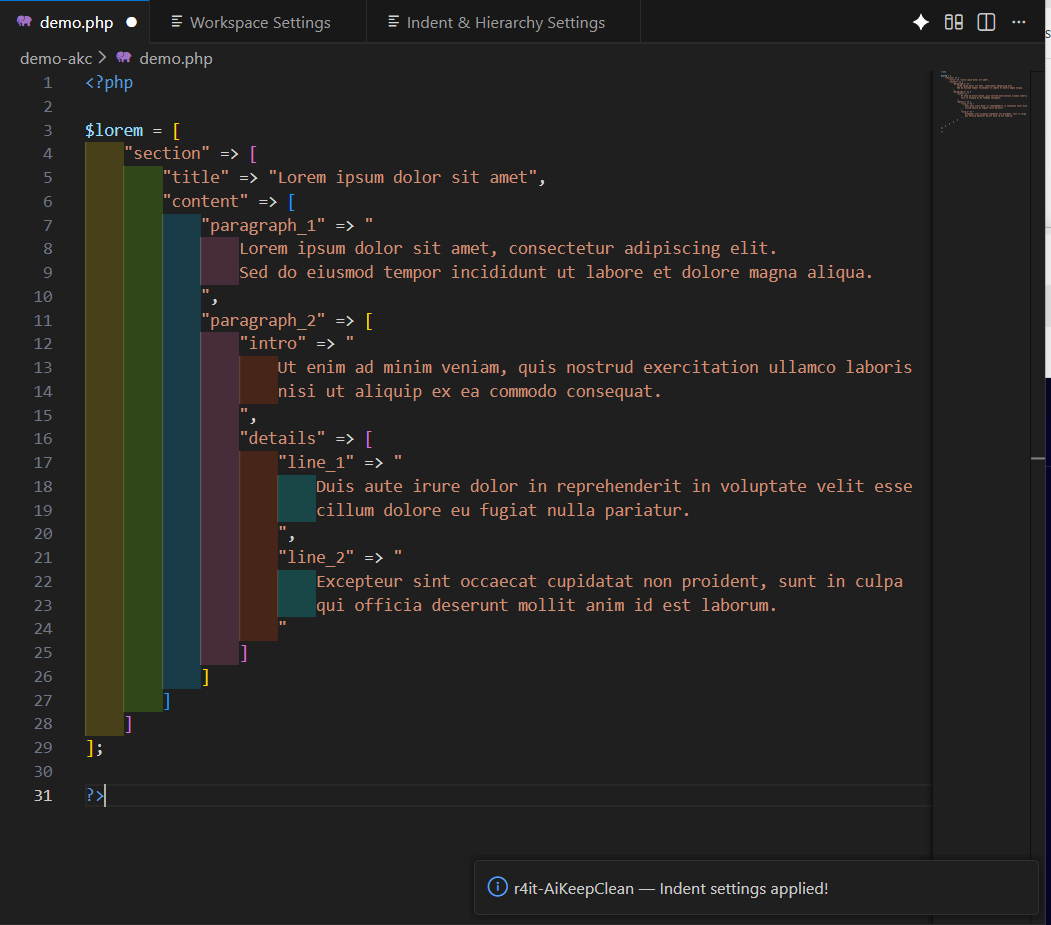
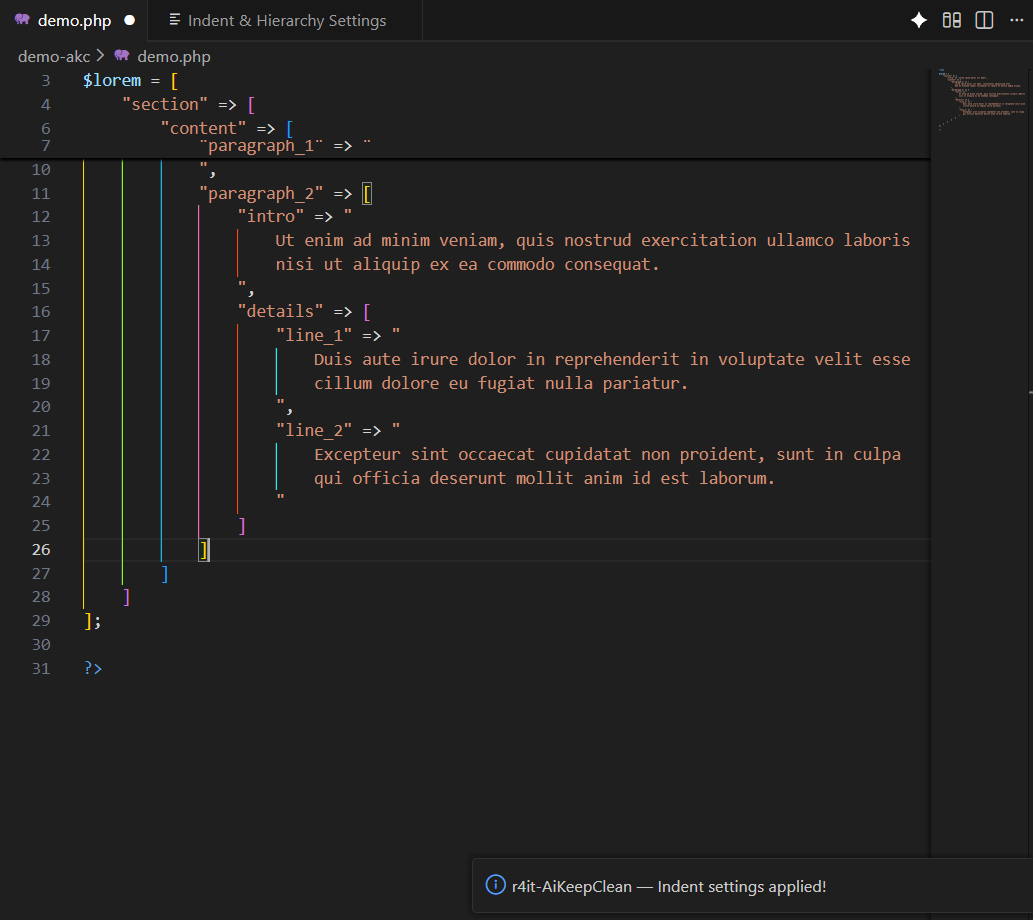
Konfigurieren Sie Kontrast und Farbstufen so, dass verschachtelte Strukturen sofort erkennbar sind.
Gerade bei grossen JSON/YAML/TS-Dateien spart das Zeit.
## 3) AI-Provider verbinden (optional)
- lokal mit Ollama oder
- cloud-basiert mit OpenAI-kompatiblem Endpoint.
Danach testen: einmal Vorschlag fuer Preset/Farbharmonie erzeugen und anwenden.
## 4) Team-Regeln festlegen
Definieren Sie eine gemeinsame Leitlinie:
- welche Presets erlaubt sind,
- welche Kontraste Mindeststandard sind,
- wie viele Ausnahmen pro Workspace akzeptiert werden.
## 5) Ergebnis pruefen
Nach 1-2 Arbeitstagen kontrollieren:
- weniger visuelle Reibung?
- bessere Orientierung in Multi-Repo-Workspaces?
- konsistente Darstellung in Team-Screenshots?
page_type: guide
sort_order: 4
locale: de
target_url: 'https://www.ready-4-it.com/akc/akc/guides/first-steps'
status: published
related_page_slugs: { }
-
product_slug: akc
page_slug: troubleshooting
page_path: akc/guides/troubleshooting
title: Troubleshooting
summary: 'Die haeufigsten AKC-Probleme und die schnellsten Loesungswege.'
content_md: |-
## AKC-Ansicht fehlt komplett
**Symptom:** Activity-Bar-Eintrag nicht sichtbar.
**Loesung:**
1. `Developer: Reload Window`
2. Extension-Status auf "Enabled" pruefen
3. VS Code-Version >= 1.85 bestaetigen
## AI-Verbindung klappt nicht
**Symptom:** Keine Vorschlaege, Timeouts oder Provider-Fehler.
**Loesung bei Ollama:**
- pruefen, ob Ollama laeuft,
- Modell vorhanden,
- Base-URL korrekt.
**Loesung bei Cloud-Endpoint:**
- API-Key gueltig,
- Endpoint erreichbar,
- Modellname korrekt.
## Lizenz wird nicht akzeptiert
**Symptom:** Aktivierung abgelehnt.
**Loesung:**
- Token exakt neu einfuegen,
- Verfalls-/Slotstatus pruefen,
- bei Geraetewechsel ggf. erst deaktivieren.
## Darstellung wirkt unlesbar
**Symptom:** Kontrast zu schwach, Farben zu nah beieinander.
**Loesung:**
- auf stabiles Preset zurueckstellen,
- Kontrastwerte erhoehen,
- nur eine Variable nach der anderen anpassen.
page_type: guide
sort_order: 5
locale: de
target_url: 'https://www.ready-4-it.com/akc/akc/guides/troubleshooting'
status: published
related_page_slugs: { }
-
product_slug: akc
page_slug: prerequisites
page_path: akc/guides/prerequisites
title: Prerequisites
summary: 'What you need before installing AI Keep Clean.'
content_md: |-
## What AKC Is For
AI Keep Clean is a VS Code extension for workspace visual structure:
- consistent workspace coloring,
- clear orientation in status/title/side bars,
- optional AI suggestions for color harmony and presets.
## Technical Requirements
| Component | Minimum | Recommendation |
|---|---|---|
| VS Code | 1.85+ | latest stable |
| OS | Windows/macOS/Linux | 64-bit |
| Internet | only for cloud AI and license activation | stable connection |
## AI Requirements (Optional)
You can use AKC without AI. For AI features add one of these options:
### Option A: Ollama (local)
- running Ollama service
- at least one model (for example `llama3`)
- reachable endpoint (default `http://localhost:11434`)
### Option B: OpenAI-compatible provider
- API endpoint
- API key
- valid model name
## License Requirements
- **Free tier**: no activation needed.
- **Trial/Pro**: token required for advanced capabilities.
page_type: guide
sort_order: 1
locale: en
target_url: 'https://www.ready-4-it.com/akc/guides/prerequisites'
status: published
related_page_slugs: { }
-
product_slug: akc
page_slug: installation
page_path: akc/guides/installation
title: Installation
summary: 'Install AI Keep Clean from VS Code Marketplace.'
content_md: |-
## Install from Marketplace
1. In VS Code press `Ctrl+Shift+X`
2. Search for **AI Keep Clean**
3. Click **Install**
4. Reload VS Code window if the AKC view does not appear immediately
Marketplace:
https://marketplace.visualstudio.com/items?itemName=ready-4-it.aikeepclean
CLI alternative:
```bash
code --install-extension ready-4-it.aikeepclean
```
## Post-install Quick Check
- AKC view appears in Activity Bar
- AKC settings are visible
- view loads without errors
## Typical install issues
- Missing view: run `Developer: Reload Window`
- Missing commands: confirm extension is enabled
- Legacy config leftovers: use `r4it.ai.shared.*` settings only
page_type: guide
sort_order: 2
locale: en
target_url: 'https://www.ready-4-it.com/akc/guides/installation'
status: published
related_page_slugs: { }
-
product_slug: akc
page_slug: license
page_path: akc/guides/license
title: 'Activate Your License'
summary: 'Understand Free, Trial and Pro activation flow.'
content_md: |-
## License Model
- **Free**: no token required, ready immediately.
- **Trial**: full feature window for evaluation.
- **Pro**: extended capabilities for daily team use.
## Activation Steps
1. Open AKC license view
2. Paste activation token
3. Confirm resulting status (Free/Trial/Pro)
## Device Switch
If you move to another machine:
1. deactivate old device in license view
2. activate on the new device
3. verify status again
## If Activation Fails
- remove accidental leading/trailing spaces in token
- verify network access
- contact support for slot/binding issues
page_type: guide
sort_order: 3
locale: en
target_url: 'https://www.ready-4-it.com/akc/guides/license'
status: published
related_page_slugs: { }
-
product_slug: akc
page_slug: first-steps
page_path: akc/guides/first-steps
title: 'First Steps'
summary: 'Set up presets, hierarchy and optional AI provider.'
content_md: |-
## 1) Start With a Preset
Begin from a preset before manual micro-tuning. This gives you a readable baseline quickly.
## 2) Calibrate Hierarchy and Indent View
Tune contrast and color levels so nested structures are immediately visible, especially in large JSON/YAML/TS files.
## 3) Connect AI Provider (Optional)
- local with Ollama, or
- cloud with an OpenAI-compatible endpoint.
Then test one preset suggestion and apply it.
## 4) Define Team Rules
Agree on:
- allowed presets,
- minimum contrast standards,
- acceptable per-workspace exceptions.
## 5) Validate After 1-2 Days
Check whether you see less visual friction, better orientation in multi-repo workspaces, and cleaner consistency in team screenshots.
page_type: guide
sort_order: 4
locale: en
target_url: 'https://www.ready-4-it.com/akc/guides/first-steps'
status: published
related_page_slugs: { }
-
product_slug: akc
page_slug: troubleshooting
page_path: akc/guides/troubleshooting
title: Troubleshooting
summary: 'Common AKC setup and runtime issues and fixes.'
content_md: |-
## AKC View Missing
**Symptom:** no Activity Bar entry.
**Fix:**
1. run `Developer: Reload Window`
2. confirm extension status is Enabled
3. verify VS Code version is >= 1.85
## AI Connection Not Working
**Symptom:** no suggestions, timeout, provider errors.
**Fix for Ollama:**
- verify Ollama is running
- verify model is installed
- verify base URL
**Fix for cloud endpoint:**
- verify API key
- verify endpoint
- verify model name
## License Rejected
**Symptom:** activation denied.
**Fix:**
- paste token again exactly
- check expiry/slot status
- deactivate old machine first when switching devices
## Readability Is Poor
**Symptom:** weak contrast or too-similar colors.
**Fix:**
- reset to stable preset
- increase contrast
- change one variable at a time
page_type: guide
sort_order: 5
locale: en
target_url: 'https://www.ready-4-it.com/akc/guides/troubleshooting'
status: published
related_page_slugs: { }
-
product_slug: akc
page_slug: prerequisites
page_path: akc/guides/prerequisites
title: Prerequis
summary: 'Ce dont vous avez besoin avant dinstaller AI Keep Clean.'
content_md: |-
## A quoi sert AKC
AI Keep Clean est une extension VS Code pour la structure visuelle des workspaces :
- couleurs coherentes par workspace,
- orientation claire (barre de statut, titre, panneaux),
- suggestions IA optionnelles pour harmonies et presets.
## Prerequis techniques
| Composant | Minimum | Recommande |
|---|---|---|
| VS Code | 1.85+ | derniere stable |
| Systeme | Windows/macOS/Linux | 64 bits |
| Internet | seulement pour IA cloud et activation licence | connexion stable |
## Prerequis IA (optionnel)
AKC fonctionne sans IA. Pour les fonctions IA, ajoutez une option :
### Option A : Ollama local
- service Ollama actif
- au moins un modele (ex. `llama3`)
- endpoint joignable (`http://localhost:11434`)
### Option B : service compatible OpenAI
- endpoint API
- cle API
- modele valide
## Prerequis licence
- **Free** : utilisation immediate, sans activation.
- **Trial/Pro** : token requis pour les fonctions avancees.
page_type: guide
sort_order: 1
locale: fr
target_url: 'https://www.ready-4-it.com/akc/guides/prerequisites'
status: published
related_page_slugs: { }
-
product_slug: akc
page_slug: installation
page_path: akc/guides/installation
title: Installation
summary: 'Installer AI Keep Clean depuis le Marketplace VS Code.'
content_md: |-
## Installation depuis le Marketplace
1. Dans VS Code : `Ctrl+Shift+X`
2. Rechercher **AI Keep Clean**
3. Cliquer **Install**
4. Recharger la fenetre VS Code si la vue AKC napparait pas
Marketplace :
https://marketplace.visualstudio.com/items?itemName=ready-4-it.aikeepclean
Alternative CLI :
```bash
code --install-extension ready-4-it.aikeepclean
```
## Verification rapide
- vue AKC visible dans la barre laterale
- options AKC visibles dans les settings
- chargement sans erreur
## Erreurs frequentes
- vue absente : `Developer: Reload Window`
- commandes absentes : verifier extension active
- anciens restes de config : utiliser seulement `r4it.ai.shared.*`
page_type: guide
sort_order: 2
locale: fr
target_url: 'https://www.ready-4-it.com/akc/guides/installation'
status: published
related_page_slugs: { }
-
product_slug: akc
page_slug: license
page_path: akc/guides/license
title: 'Activer votre licence'
summary: 'Comprendre Free, Trial et Pro puis activer le token.'
content_md: |-
## Modele de licence
- **Free** : aucun token requis.
- **Trial** : fenetre complete pour evaluation.
- **Pro** : fonctions etendues pour usage equipe.
## Activation
1. Ouvrir la vue licence AKC
2. Coller le token
3. Verifier le statut (Free/Trial/Pro)
## Changement de machine
1. desactiver lancien appareil
2. activer le nouveau
3. verifier le statut
## Echec dactivation
- verifier espaces avant/apres token
- verifier acces reseau
- contacter le support pour slots/binding
page_type: guide
sort_order: 3
locale: fr
target_url: 'https://www.ready-4-it.com/akc/guides/license'
status: published
related_page_slugs: { }
-
product_slug: akc
page_slug: first-steps
page_path: akc/guides/first-steps
title: 'Premiers pas'
summary: 'Configurer preset, hierarchie et provider IA optionnel.'
content_md: |-
## 1) Demarrer avec un preset
Commencez avec un preset pour obtenir une base lisible rapidement.
## 2) Ajuster hierarchie et indent
Ajustez contraste et niveaux de couleur pour voir immediatement la structure imbriquee.
## 3) Connecter un provider IA (optionnel)
- local avec Ollama, ou
- cloud via endpoint compatible OpenAI.
Puis testez une suggestion de preset.
## 4) Definir des regles equipe
- presets autorises
- contraste minimum
- exceptions acceptees
## 5) Verifier apres 1-2 jours
Mesurez la reduction de friction visuelle et la coherence des workspaces partages.
page_type: guide
sort_order: 4
locale: fr
target_url: 'https://www.ready-4-it.com/akc/guides/first-steps'
status: published
related_page_slugs: { }
-
product_slug: akc
page_slug: troubleshooting
page_path: akc/guides/troubleshooting
title: Depannage
summary: 'Solutions pour problemes AKC les plus courants.'
content_md: |-
## Vue AKC absente
**Symptome :** entree absente dans la barre.
**Solution :**
1. `Developer: Reload Window`
2. verifier extension active
3. verifier VS Code >= 1.85
## Connexion IA en erreur
**Symptome :** pas de suggestion, timeout, erreurs provider.
**Solution Ollama :**
- service actif
- modele present
- URL correcte
**Solution cloud :**
- cle API valide
- endpoint joignable
- nom de modele correct
## Licence refusee
- recoller token exactement
- verifier expiration/slots
- desactiver ancien appareil avant migration
## Lisibilite faible
- revenir a un preset stable
- augmenter le contraste
- changer une variable a la fois
page_type: guide
sort_order: 5
locale: fr
target_url: 'https://www.ready-4-it.com/akc/guides/troubleshooting'
status: published
related_page_slugs: { }
-
product_slug: akc
page_slug: prerequisites
page_path: akc/guides/prerequisites
title: Viraussetzungen
summary: 'Wat Dir braucht ier Dir AI Keep Clean installéiert.'
content_md: |-
## Woufir AKC geduecht ass
AI Keep Clean ass eng VS Code Extension fir visuell Workspace-Struktur:
- konsequent Faarwen pro Workspace,
- kloer Orientatioun an Statusbar/Titel/Panels,
- optional AI-Virschlae fir Harmonie a Presets.
## Technesch Viraussetzungen
| Komponent | Minimum | Recommandatioun |
|---|---|---|
| VS Code | 1.85+ | aktuell Stable |
| Betribssystem | Windows/macOS/Linux | 64-Bit |
| Internet | just fir Cloud-AI an Lizenzaktivatioun | stabil Verbindung |
## AI-Viraussetzungen (optional)
AKC leeft och ouni AI. Fir AI-Funktiounen braucht Dir zousaetzlech:
### Optioun A: Ollama lokal
- laafenden Ollama Service
- op mannst ee Modell (z.B. `llama3`)
- erreechbaren Endpoint (`http://localhost:11434`)
### Optioun B: OpenAI-kompatibelen Provider
- API Endpoint
- API Key
- valabel Modellnumm
## Lizenz-Viraussetzungen
- **Free Tier**: direkt benotzbar, keng Aktivatioun.
- **Trial/Pro**: Token néideg fir erweidert Funktiounen.
page_type: guide
sort_order: 1
locale: lb
target_url: 'https://www.ready-4-it.com/akc/guides/prerequisites'
status: published
related_page_slugs: { }
-
product_slug: akc
page_slug: installation
page_path: akc/guides/installation
title: Installatioun
summary: 'AI Keep Clean am VS Code Marketplace installéieren.'
content_md: |-
## Installatioun iwwert Marketplace
1. An VS Code: `Ctrl+Shift+X`
2. No **AI Keep Clean** sichen
3. **Install** klicken
4. VS Code nei lueden wann dAKC-View net direkt erschengt
Marketplace:
https://marketplace.visualstudio.com/items?itemName=ready-4-it.aikeepclean
CLI-Alternative:
```bash
code --install-extension ready-4-it.aikeepclean
```
## Schnellkontroll nom Installéieren
- AKC-View an der Activity Bar sichtbar
- AKC-Settings sichtbar
- keng Feeler beim Lueden
## Heefeg Installatiounsproblemer
- View feelt: `Developer: Reload Window`
- Commanden feelen: kontrolléieren ob Extension enabled ass
- al Config-Rester: just `r4it.ai.shared.*` benotzen
page_type: guide
sort_order: 2
locale: lb
target_url: 'https://www.ready-4-it.com/akc/guides/installation'
status: published
related_page_slugs: { }
-
product_slug: akc
page_slug: license
page_path: akc/guides/license
title: 'Lizenz aktivéieren'
summary: 'Free, Trial a Pro verstoen an Token aktivéieren.'
content_md: |-
## Lizenzmodell
- **Free**: kee Token néideg.
- **Trial**: komplette Funktiounsumfang fir Testzait.
- **Pro**: erweidert Funktiounen fir Team-Alldag.
## Aktivatioun
1. AKC-Lizenzview opmaachen
2. Token afügen
3. Status kontrolléieren (Free/Trial/Pro)
## Geraete-Wiessel
1. al Geraet deaktivéieren
2. neit Geraet aktivéieren
3. Status nach eng Kéier kontrolléieren
## Wann Aktivatioun scheitert
- Token op Leerzeechen kontrolléieren
- Netzverbindung kontrolléieren
- Support kontaktéieren bei Slot/Binding-Themen
page_type: guide
sort_order: 3
locale: lb
target_url: 'https://www.ready-4-it.com/akc/guides/license'
status: published
related_page_slugs: { }
-
product_slug: akc
page_slug: first-steps
page_path: akc/guides/first-steps
title: 'Eischt Schrëtt'
summary: 'Preset, Hierarchie an optionalen AI-Provider astellen.'
content_md: |-
## 1) Mat engem Preset starten
Ufanks e Preset huelen amplaz direkt Mikrotuning. Dat gëtt séier eng liesbar Basis.
## 2) Hierarchie an Indent kalibréieren
Kontrast an Faarfstufen esou astellen datt verschachtelt Struktur direkt ze erkennen ass.
## 3) AI-Provider verbannen (optional)
- lokal mat Ollama, oder
- cloud-baséiert mat OpenAI-kompatiblem Endpoint.
Duerno ee Preset-Virschlag testen.
## 4) Team-Reegelen definéieren
- erlaabte Presets
- Mindest-Kontrast
- Ausnamen pro Workspace
## 5) No 1-2 Deeg evaluéieren
Kucken ob manner visuell Reiwung, besser Orientatioun a méi konsequent Team-Workspaceecht do ass.
page_type: guide
sort_order: 4
locale: lb
target_url: 'https://www.ready-4-it.com/akc/guides/first-steps'
status: published
related_page_slugs: { }
-
product_slug: akc
page_slug: troubleshooting
page_path: akc/guides/troubleshooting
title: Troubleshooting
summary: 'Heefeg AKC-Problemer an direkt Léisungen.'
content_md: |-
## AKC-View feelt
**Symptom:** keen Activity-Bar-Entrée.
**Léisung:**
1. `Developer: Reload Window`
2. Extension-Status op Enabled kontrolléieren
3. VS Code >= 1.85 kontrolléieren
## AI-Verbindung funktionéiert net
**Symptom:** keng Virschléi, Timeout oder Provider-Feeler.
**Léisung Ollama:**
- Service leeft
- Modell installéiert
- Base-URL richteg
**Léisung Cloud:**
- API-Key valabel
- Endpoint erreechbar
- Modellnumm richteg
## Lizenz gëtt refuséiert
- Token exakt nei afügen
- Verfall/Slots kontrolléieren
- al Geraet als éischt deaktivéieren
## Liesbarkeet schwaach
- op stabille Preset zerécksetzen
- Kontrast erhéijen
- just eng Variabel gläichzäiteg änneren
page_type: guide
sort_order: 5
locale: lb
target_url: 'https://www.ready-4-it.com/akc/guides/troubleshooting'
status: published
related_page_slugs: { }gallery_items:
  file: 01.png
-
  file: 02.png
-
  file: 03.png
-
  file: 04.png
-
  file: 05.png
-
  file: 06.png
publishing: beta: false hidden: false coming_soon: false offers: channel: standard early_access: mode: date_window valid_from: '2026-02-15' valid_until: '2026-07-31' discount_percentage: 20 after_end_behavior: switch_to_standard prices_by_tier: pro: €39 vetter: display_name: en: 'AI Keep Clean' de: 'AI Keep Clean' fr: 'AI Keep Clean' lb: 'AI Keep Clean' homepage_url: 'https://www.ready-4-it.com' description: en: 'AI Keep Clean keeps VS Code tidy locally: workspace identity, presets, Explorer root colors, terminal path hygiene, and indent guides. Free tier to start; Trial/Pro when you need the full workflow stack.' de: 'AI Keep Clean hält VS Code lokal ordentlich: Workspace-Identität, Presets, Explorer-Root-Farben, Terminal-Pfad-Hygiene und Indent-Guides. Free zum Einstieg; Trial/Pro für den vollen Workflow-Stack.' fr: 'AI Keep Clean range VS Code en local : identité workspace, presets, couleurs de racines Explorer, hygiène des chemins terminal et indent guides. Niveau Free pour commencer ; Trial/Pro pour la stack complète.' lb: 'AI Keep Clean hält VS Code lokal propper: Workspace-Identitéit, Presets, Explorer-Root-Faarwen, Terminal-Pfad-Hygiene an Indent-Guides. Free fir unzefänken; Trial/Pro fir de volle Workflow-Stack.' short_tagline: en: 'Stop VS Code chaos without cloud lock-in: workspace presets, indent guides, and Explorer root colors — Free to start, Pro when you are serious.' de: 'VS Code aufräumen ohne Cloud-Zwang: Workspace-Presets, Indent-Guides und Explorer-Root-Farben — Free starten, Pro wenn es ernst wird.' fr: 'Rangez VS Code sans cloud obligatoire : presets workspace, indent guides et couleurs de racines Explorer — Free pour démarrer, Pro quand c’est sérieux.' lb: 'VS Code oprämen ouni Cloud-Zwang: Workspace-Presets, Indent-Guides an Explorer-Root-Faarwen — Free starten, Pro wann et eescht gëtt.' long_description: en: |
AI Keep Clean
    AI Keep Clean is a VS Code extension focused on **workspace-local settings hygiene**, **safe sharing via presets**, and **local-first AI workflows**.

    ### Licensing & activations

    - Licenses are **device-bound**.
    - **Free:** no activation required (works without a license key)
    - **Pro:** 2 activations per license key
    - **Team:** 10 license keys, 2 activations per key (= up to 20 devices)
    - **Enterprise:** offer: €499 for x license keys (by arrangement)

    ### Core features (current state)

    | Core feature | Included | Available since |
    |---|:---:|---|
    | Workspace settings backup/restore + merge | ✓ | v1.15.0 |
    | Directory/file compare tooling | ✓ | v1.13.0 |
    | Close All per Click (close all editors) | ✓ | v1.13.0 |
    | Hierarchy presets + indent guides | ✓ | v1.12.0 |
    | AI provider abstraction (Ollama / OpenAI-compatible) | ✓ | v1.11.0 |

    > Note: Only current, shipped functionality is listed here.
  de: |
    ## AI Keep Clean

    AI Keep Clean ist eine VS Code Extension mit Fokus auf **workspace-lokale Settings-Hygiene**, **sicheres Teilen via Presets** und **local-first KI-Workflows**.

    ### Lizenzierung & Aktivierungen

    - Lizenzen sind **gerätegebunden**.
    - **Free:** keine Aktivierung nötig (funktioniert ohne Lizenzschlüssel)
    - **Pro:** 2 Aktivierungen pro Lizenzschlüssel
    - **Team:** 10 Lizenzschlüssel, 2 Aktivierungen pro Schlüssel (= bis zu 20 Geräte)
    - **Enterprise:** Angebot: 499 € für x Lizenzschlüssel (auf Anfrage)

    ### Core Features (aktueller Stand)

    | Core Feature | Enthalten | Seit Version |
    |---|:---:|---|
    | Workspace-Settings Backup/Restore + Merge | ✓ | v1.15.0 |
    | Directory/File Compare Tools | ✓ | v1.13.0 |
    | Close All per Click (alle Editoren schließen) | ✓ | v1.13.0 |
    | Hierarchy-Presets + Indent-Guides | ✓ | v1.12.0 |
    | KI-Provider-Abstraktion (Ollama / OpenAI-kompatibel) | ✓ | v1.11.0 |

    > Hinweis: Hier steht nur aktuell ausgelieferte Funktionalität.
  fr: |
    ## AI Keep Clean

    AI Keep Clean est une extension VS Code axée sur **l’hygiène des réglages au niveau workspace**, des **presets partageables en sécurité** et des **workflows IA local-first**.

    ### Licence & activations

    - Licences **liées à la machine**.
    - **Free :** aucune activation requise (fonctionne sans clé de licence)
    - **Pro :** 2 activations par clé de licence
    - **Team :** 10 clés de licence, 2 activations par clé (= jusqu’à 20 appareils)
    - **Enterprise :** offre : 499 € pour x clés de licence (sur demande)

    ### Fonctionnalités cœur (état actuel)

    | Fonction | Incluse | Depuis |
    |---|:---:|---|
    | Sauvegarde/restauration + fusion des réglages | ✓ | v1.15.0 |
    | Comparaison de dossiers/fichiers | ✓ | v1.13.0 |
    | Close All per Click (fermer tous les éditeurs) | ✓ | v1.13.0 |
    | Presets hiérarchie + guides d’indentation | ✓ | v1.12.0 |
    | Abstraction provider IA (Ollama / API compatibles OpenAI) | ✓ | v1.11.0 |

    > Note : uniquement les fonctionnalités déjà livrées.
  lb: |
    ## AI Keep Clean

    AI Keep Clean ass eng VS Code Extension mat Fokus op **workspace-lokal Settings-Hygiene**, **sécher Presets** an **local-first KI-Workflows**.

    ### Lizenz & Aktivatiounen

    - Lizenzen sinn **gerätegebonnen**.
    - **Free:** keng Aktivatioun néideg (funktionéiert ouni Lizenzschlëssel)
    - **Pro:** 2 Aktivatiounen pro Lizenzschlëssel
    - **Team:** 10 Lizenzschlësselen, 2 Aktivatiounen pro Schlëssel (= bis zu 20 Apparater)
    - **Enterprise:** Offer: 499 € fir x Lizenzschlësselen (op Ufro)

    > Local-first KI: **Ollama** gëtt als lokale Provider ënnerstëtzt.
is_active_beta: false
logo_size: 180 category: vscode guide_cta_mode: single chips:
- 'Workspace Presets'
- 'Root Colors'
- 'Indent Guides'
- 'Local AI'
- 'Terminal Paths'
- Local-first features:
-
title: 'Workspace settings hygiene' text: 'Back up, restore, and merge workspace settings with a clean workflow.' chips:
- Backup
- Restore
- Merge
-
title: 'Safe sharing via presets' text: 'Presets are built-in and always included. Export/import preset collections for teams.' chips:
- Presets
- JSON
- Share
-
title: 'Directory & file compare tooling' text: 'Compare files and folders (2-way/3-way) with a clean, repeatable workflow. Note: Compare/Diff is a convenience feature and is not part of AKC’s core functionality.' chips:
- Diff
- 2-way
- 3-way
-
title: 'Close All per Click' text: 'Close all editors fast to reduce noise and keep focus (especially in big workspaces).' chips:
- Focus
- 'Clean up'
-
title: 'AI provider abstraction' text: 'Local-first by design: use Ollama or OpenAI-compatible endpoints without locking in.' chips:
- Ollama
- 'OpenAI API'
- Local-first
-
title: 'Security-minded UX' text: 'Strict webview CSP and clear confirmations for risky actions.' chips:
- CSP
-
Confirmations overview: columns:
key: aspect label: Aspect
key: free label: Free
key: trial label: Trial
key: pro label: Pro rows:
values: aspect: 'Max custom presets' free: '1' trial: '3' pro: '150'
values: aspect: 'Import presets' free: – trial: ✓ pro: ✓
values: aspect: 'Export presets' free: – trial: ✓ pro: ✓
values: aspect: 'AI suggestions' free: – trial: ✓ pro: ✓
values: aspect: 'Max workspaces (planned)' free: '25' trial: '50' pro: ∞
values: aspect: 'Explorer root colors (builtin) (since v1.22.39)' free: ✓ trial: ✓ pro: ✓ team: ✓ enterprise: ✓
aspect: 'Terminal colors (PowerShell/pwsh) (since v1.18.9)' free: ✓ trial: ✓ pro: ✓
values: aspect: 'AI Diff: files' free: – trial: ✓ pro: ✓
values: aspect: 'AI Diff: directories' free: – trial: ✓ pro: ✓
values: aspect: 'Indent Rainbow: line' free: ✓ trial: ✓ pro: ✓
values: aspect: 'Indent Rainbow: block' free: ✓ trial: ✓ pro: ✓ personal_note: enabled: true title: 'Overview keeps you focused' text: | Overview is essential for developers. It helps you keep your focus on what matters.
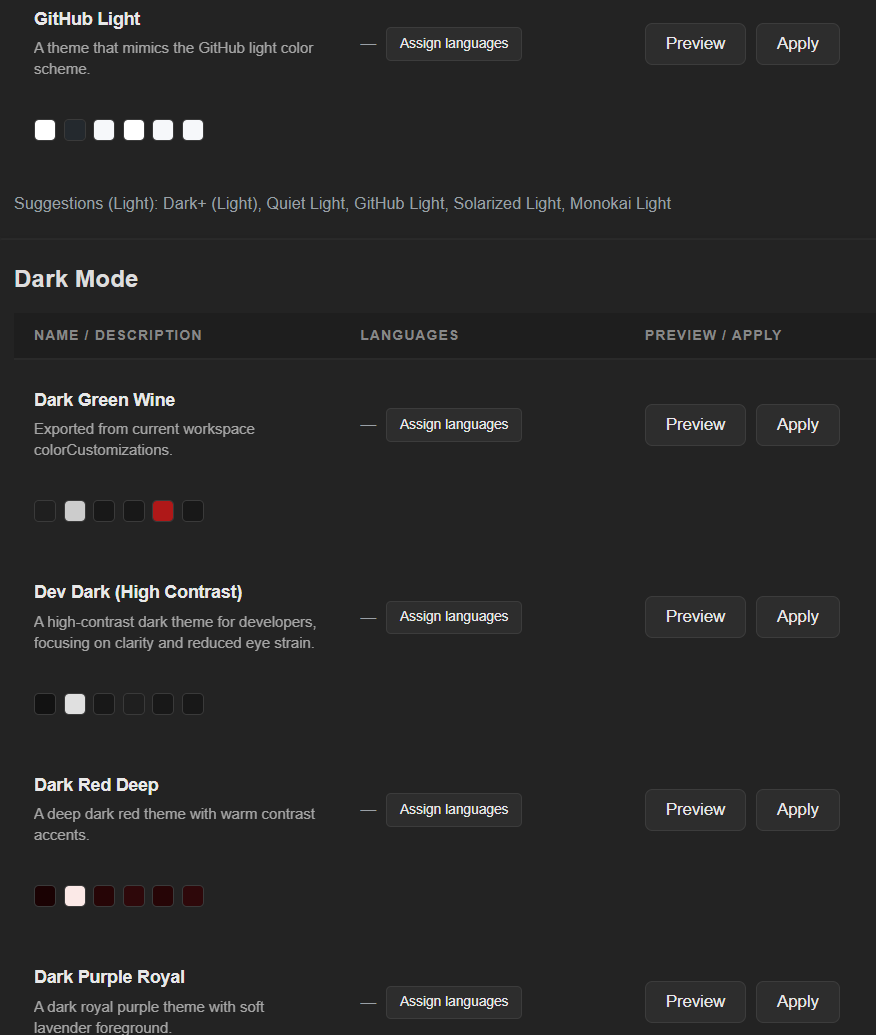
With AI Keep Clean, color-organizing multiple workspaces takes seconds: clear project boundaries, tabs instantly recognizable.
If you code for hours, you know the feeling: stay in the code — not in the search.
Local-first AI: Ollama is supported as a local provider. cta:
-
label: 'Install (VS Code Marketplace)' href: 'https://marketplace.visualstudio.com/items?itemName=ready-4-it.r4it-aikeepclean' style: primary
-
label: Buy href: '#licensing' style: primary pim_auto: payhip translationKey: akc routes: aliases:
- /akc
- /en/akc
- /03.produktoverview/akc
- /en/03.produktoverview/akc requirements: note: 'Installation: VS Code öffnen → Extensions (Ctrl+Shift+X) → Marketplace-ID in die Suche eingeben. Nur fuer VS Code getestet. Derivate wie Cursor bitte vor dem Kauf selbst pruefen.' columns:
-
key: requirement label: Requirement
-
key: version label: 'Version / Status' rows:
-
values: requirement: 'Host platform' version: 'VS Code (Windows, macOS, Linux)'
-
values: requirement: 'Extension type' version: 'VS Code Extension'
-
values: requirement: Marketplace-ID version: ready-4-it.r4it-aikeepclean
-
values: requirement: 'Minimum VS Code version' version: 1.85+
-
values: requirement: 'Recommended VS Code version' version: 'Latest stable'
-
values: requirement: 'AI providers (optional)' version: 'Ollama, OpenAI, Azure OpenAI or compatible' packs_table: columns:
-
key: pack label: Pack
-
key: price label: Price
-
key: included label: Included rows:
-
values: pack: 'Team Onboarding' price: €99 included: 'Online session (60–90 min) + up to 5 team presets + rollout checklist'
-
values: pack: 'Enterprise Hardening' price: €299 included: 'Hardening workshop (60–90 min) + baseline preset bundle (JSON) + hardening checklist' note: |- Team Onboarding — 1× online session (approx. 60–90 min): we set up AKC together, walk through preset export/import, and create up to 5 team presets (e.g. color/workspace layouts for your repos). Delivery: preset export (JSON) + a short rollout checklist. Recommended: up to 6 participants.
Enterprise Hardening — 1× hardening workshop (approx. 60–90 min): we work together with your team to review your current preset export/import workflow and derive a safe baseline setup (no product features required). Delivery: baseline preset bundle (JSON) + a written hardening checklist (separate document). Recommended: up to 6 participants. Note: this is a service/workshop (analysis + written deliverables). Any implementation/programming work is scoped and billed separately as a project. tables_position: bottom requirements_display: guides_only hero_cta_max: 3 license_badges:
-
freemium
AI Keep Clean
AI Keep Clean is a VS Code extension focused on workspace-local settings hygiene, safe sharing via presets, and local-first AI workflows.
Licensing & activations
- Licenses are device-bound.
- Free: no activation required (works without a license key)
- Pro: 2 activations per license key
- Team: 10 license keys, 2 activations per key (= up to 20 devices)
- Enterprise: offer: €499 for x license keys (by arrangement)
Core features (current state)
| Core feature | Included | Available since |
|---|---|---|
| Workspace settings backup/restore + merge | ✓ | v1.15.0 |
| Directory/file compare tooling | ✓ | v1.13.0 |
| Close All per Click (close all editors) | ✓ | v1.13.0 |
| Hierarchy presets + indent guides | ✓ | v1.12.0 |
| AI provider abstraction (Ollama / OpenAI-compatible) | ✓ | v1.11.0 |
Note: Only current, shipped functionality is listed here.